Posts

How to enable Wi-Fi in iBall AirWay 21.0 MP

Download the iBall Soft AP Manager app Just Google the Dongle name. The download link is available at the Official website of iBall. Install and open the app. Click start Wi-Fi share. Go to Control Panel -> Network and Internet ->Network and Sharing centre. Click change adapter settings. Under sharing tab check the first box saying 'Share this device's internet connection'. Now search using the other device and you can connect.

How to earn money from YouTube

Image
Many people wonder how would we earn money from YouTube for uploading videos. Yes, this is serious. You can earn money from YouTube by publishing videos. Also, the service is available for publishers from India.     Generating revenue from YouTube is not that easy. The hardest step is to get your YouTube account eligible for monetization. Once the account get monetized, you can generate revenues somewhat easy if you create content frequently and get reasonable amount of views. HOW IT WORKS? First of all, let's see how all these things work. Let me tell you this first. Payment is not based on the number of views. You create and publish videos. So, you're the publisher. To maximize the coverage of their products companies would like to place their ads along with your videos. It's this ads for which you're getting paid. Payment criteria depends on the type of ad.       Types of ads Overlay ads : This kind of ads appear as an overlay inside your v...

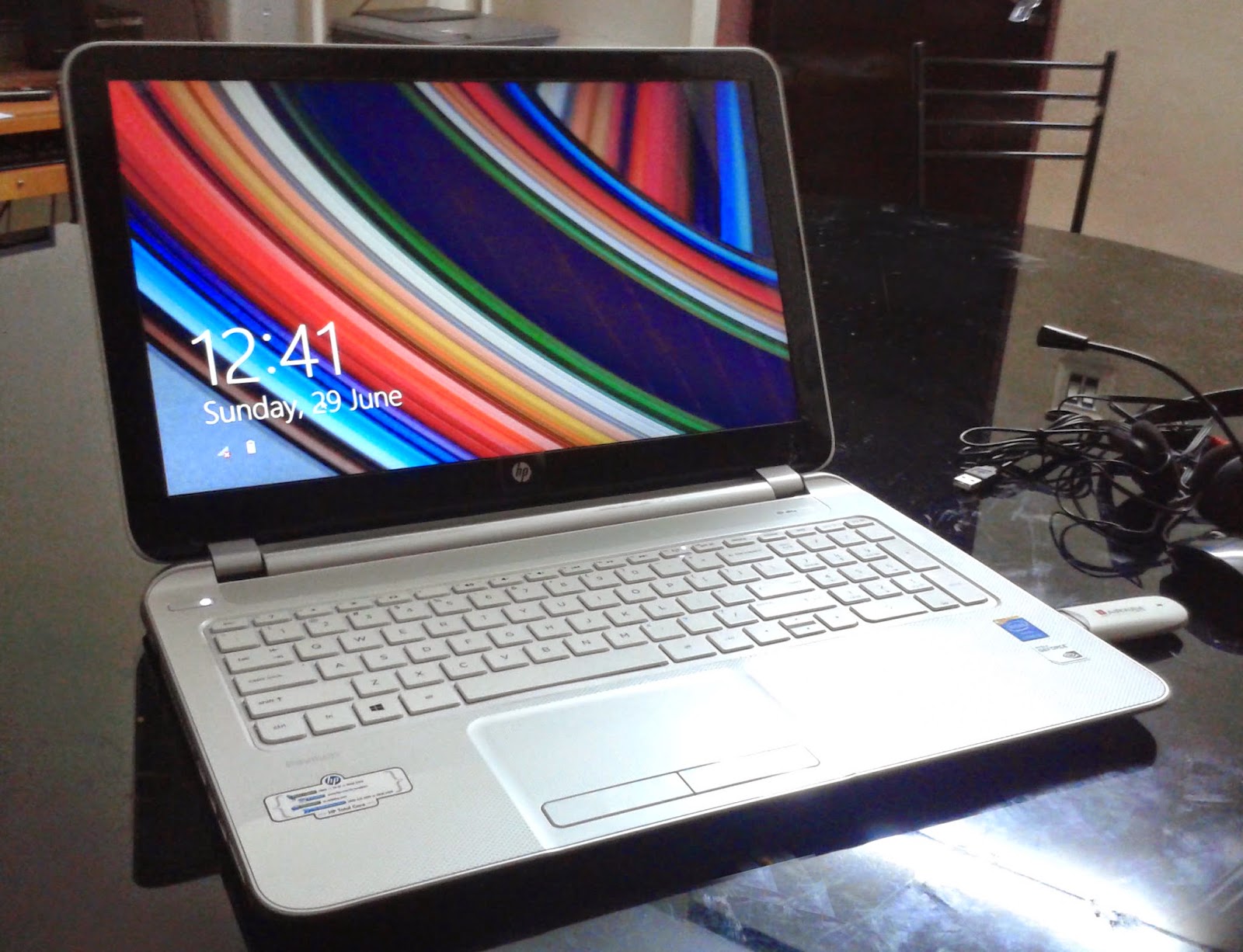
My review : HP Pavilion 15-n209TX Laptop

Image
Quick specs 4th Gen Ci5 4GB RAM 1TB HDD Windows 8.1 2GB NVIDIA GeForce 740 M Price : Around 50,000 INR I had been using this laptop for more than 2 weeks now and I share below my experience with this. PROS The device is superb in terms of looks. It's very thin compared to the competitors from Dell. Equivalent Dell models are bulkier than this. It's got a 15.6-inch HD BrightView LED Backlit screen with a resolution of 1366x768 pixels. The display is very vibrant and looks fantastic in Performance mode. Sound quality is exceptionally good. The speakers use DTS+ technology and  are provided as a single row just in front of the keyboard. It's loud and the sound is crystal clear. The 4th Gen. core i5 is a silent performer. It produces minimum heat even on prolonged usage. You don't have to worry about the lower bound clock frequency. It's got turbo boost and locks into higher frequencies when situation demands. The boot is lighting fas...

Youtube : Monitoring for possible review, how to fix?

Image
I am reposting this since this post brought about almost 50% of the traffic to this blog. :) This method worked for two of my videos under review. Like and subscribe if it work for you! :)

Multiplayer config for Farming simulator 2013 on D-Link router.

For playing farming simulator multiplayer, you first need to portforward a specific port of your router. Port forwarding is very simple. Just follow the steps below. First of all, find your computers IP address (Assume this computer is creating the game and others join the game) To find IP address of your computer, open command prompt and enter the command 'ipconfig'. There, against Ipv4 address you find your computer's IP address. Login to your router (Enter 192.168.1.1 into your address bar. Default username and password both are 'admin') It's now the actual port-forwarding procedure begins. Once you're logged in, to the left of the screen you can see different options. Click the  Advanced Setup  link. You should now see a new menu. In this new menu, click  NAT . You should now see a new menu. In this new menu, click  Virtual Servers . Click the  Add  button near the center of the page. Select custom service and give it any name. ...

How to connect a laptop to a PC via Wi-Fi router (Win 7 & Win 8)

A laptop and a PC can be connected together for fast data transfer through a Wi-Fi router using homegroups. Inorder to do this, you have to first create a 'Home group' on one of the machines, either the laptop or the PC. Once a 'Home group' has been created on one of them, the other one can simply join the network to share files. Just follow the steps below. Go to control panel In the top right corner, search 'home group' Open HomeGroup If no homegroups have been created so far, it'll display the same and there will be a 'Create home group' button. Click it. Now check what all things you're going to share in the home group. Click next, now it'll display a password for the home group. There's no need to note it. Just click finish. Now change the password to something you can remember. That's all. The home group is ready. Now turn on the other device. Make sure Wi-Fi is on. The other device will detect the previuosly...

How to Rectify Slow / Unstable Internet Speed / Stability Problem - BSNL Broadband

The Broadband Speed does not alone depend upon the Broadband Plan of the connection ,  there are multiple factors that boost or enhance the performance of Broadband speed on your System. Just for the knowledge & for better understanding you can note down the following points. Pls keep these points/steps in mind while Installing/Troubleshooting Broadband connection or resolving Internet speed problem. I am sure it will help in improving your Internet experience with BSNL.    Steps for a Trouble-free Broadband Internet Connection: -    1. For Reliability & Speed, Use following DNS Addresses: A) On  Dial-up or Bridge mode  Broadband connections. Enter following DNS address at Local Area Connection or Wireless Network Connection. Primary DNS  -- 192.168.1.1 (Filling this IP will automatically takes first DNS server from BSNL) Alternate DNS  -- 156.154.70.1 or 156.154.71.1 or 4.2.2.2 or 208.67.222.222 or 208.67.220.220 ...