Posts

Easiest Rooting guide for Samsung Galaxy S Duos GT-S7562 (Including Custom ROM installation)

Image
CONENTS: How to root Samsung Galaxy S Duos? How to install Clock Work Mode Recovery on Samsung Galaxy S Duos? How to Install Custom ROM (PMP Ultra ROM) on Samsung Galaxy S Duos? 1. How to root Samsung Galaxy S Duos? Download the 'Kingo Root' application (18 MB) from here :  Download In case, if you don't have Samsung USB drivers on PC, install them. They're automatically installed when installing Samsung Kies On your phone, goto Settings>Development> tick the option USB Debugging Connect the phone to PC using USB cable. Connect your internet on PC. Kingo Root needs internet for downloading necessary scripts. Open Kingo Root. It may show "Device Not Supported Blah Blah Blah". Don't care. Just wait till the app downloads the necessary scripts. Now click the 'Root' button. A dialog box will open in the phone prompting a reboot. Click Reboot. Congrats! Your phone is roo...
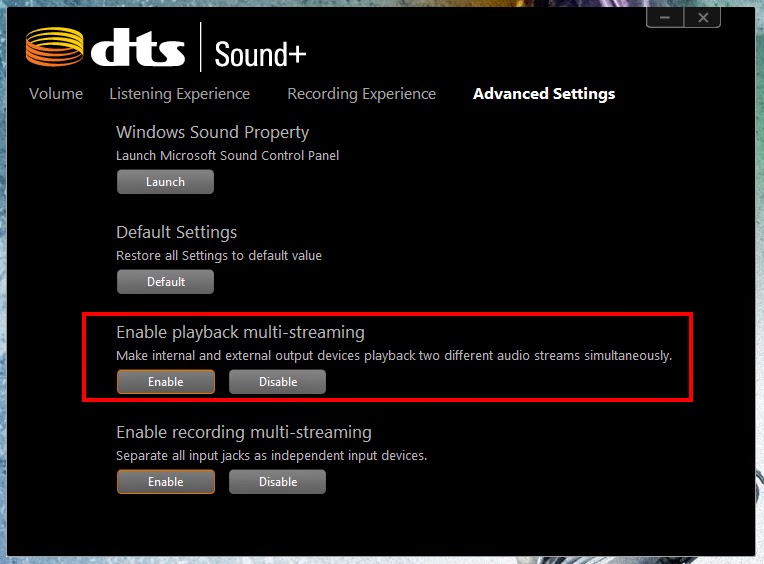
Separate Audio for Home Theatre system when using HDMI cable

Image
Problem :  When using an HDMI cable, audio is available only through the TV speakers and it is not possible to take AUX out for other devices (Like a Home Theatre System). Solution : I use an HP Pavillion n209TX laptop and this is how I solved it: Go to your Audo settings. (For me, it is DTS) Go to advanced settings Enable the option shown in the image below. Now the TV and the other device will have separate audio channels.

desktop.ini file starts automatically, How to fix - Update

This happens if the Hidden attribute for the desktop.ini file is somehow removed. Follow these steps to resolve the problem: Open an elevated Command Prompt window. To do so, click Start, click All Programs, click Accessories, right-click Command Prompt, and then click Run as administrator. Type the following commands below and press ENTER after typing each command. (You may copy the text below and paste it in the Command Prompt window.) attrib +s +h "%appdata%\Microsoft\Windows\Start Menu\Programs\Startup\desktop.ini" And then run the following command: attrib +s +h "%programdata%\Microsoft\Windows\Start Menu\Programs\Startup\desktop.ini" Exit and Restart.

Earth and the Giant Mirror

I was wondering what if we place a Giant Mirror equivalent to the size of the earth at a distance of 10 light years from the earth? Theoretically, we should be able to see the earth as it was 20 years before. Because the light rays from earth take 10 years to reach the mirror and another 10 years to travel back to earth. But, practically almost impossible.

How to Organise posts in a Blog in different pages?

I'll be writing about that very soon. Honestly I don't have time right now.

FIFA 13 System Restart problem : How to fix

Every time you open FIFA 13, after some minutes of playing, it displays a message like "Your system ran into a problem and we'll fix it and restart for you". This used to happen to me the first time I ran FIFA 13 after each boot. If you're running on Windows 8, this can be avoided by running the program in Windows 7 compatibility mode. I have done that and the above said problem hasn't appeared so far. To setup compatibility mode: Right click Fifa13.exe Click 'Troubleshoot compatibility' Now, in the window, select the 2nd option. Select Windows 7 and click ok. Test the program.

desktop.ini file starts automatically : How to fix?

When you start the computer, Notepad starts and one or more text documents that contain the following lines appears on the Windows desktop: [.ShellClassInfo] LocalizedResourceName=@%SystemRoot%\system32\shell32.dll,-21787 Method 1: Delete the Desktop.ini File Start Windows Explorer. On the  Tools  menu, click  Folder Options , and then click the  View  tab. In the  Advanced settings  box, click to clear the  Hide extensions for known file types  check box and the  Hide protected operating system files  check box (if they are not already cleared), and then click  OK . Delete any occurrences of the Desktop.ini file that contains the lines described earlier in the "Symptoms" section of this article. To do so: Locate each of the following folders, right-click the  Desktop.ini  file (if the file exists in that folder), and then click Open : drive :\Documents and Settings\All Users\Start Menu\Programs\St...